Understanding the infrastructure requirements for VMAF
Video Multimethod Assessment Fusion (VMAF) has evolved beyond the v0.6 model family: its implementation now includes CUDA acceleration, while the newer v1 models introduce changes to both perceptual assessment and computational complexity. Werner Robitza recently compared the scores produced by the two generations in his VMAF v1 versus v0.6 study. That work provides useful context for model selection. Here, we approach a different question: what infrastructure do we need to calculate VMAF efficiently in a production deployment?
From a media infrastructure perspective, a faster quality metric matters when we evaluate bitrate ladders, compare encoder settings, or validate large libraries.
This post examines five practical questions:
(i) how the processing requirements differ between VMAF v0.6 and v1;
(ii) how much we gain by moving VMAF computation and video decoding to GPU;
(iii) when adding CPU capacity improves performance;
(iv) whether parallel processing reduces turnaround time more effectively than using a larger instance;
and (v) how those time differences can translate into infrastructure cost.
To investigate these questions, we did not design a dedicated infrastructure benchmark. Instead, we reuse the tests we ran while updating easyVMAF to validate its workflows. These tests cover different model families, HD and 4K content, two instance sizes, and single-instance and distributed processing. However, they are not exhaustive: each case ran once, without repeated measurements of variability, and some configurations were not tested. Still, the results provide a practical starting point for a broader infrastructure analysis.
Key findings
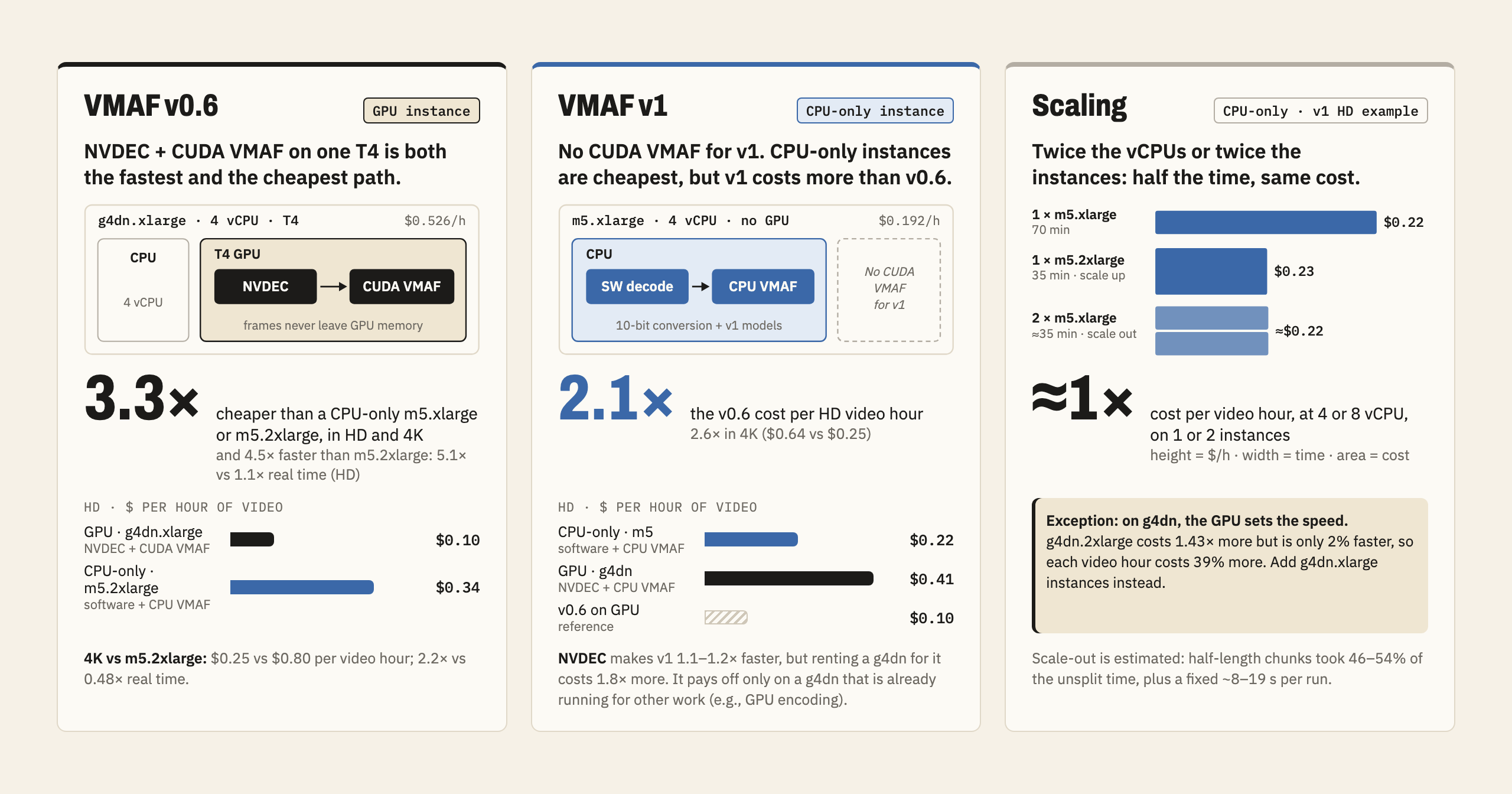
For readers who only want the conclusions, the following figure summarizes them.
In short, the VMAF model family decides the instance:
- v0.6: NVDEC + CUDA VMAF on a g4dn.xlarge (one T4 GPU) is both the fastest and the cheapest option we measured. It analyzes HD video at 5.1 times real time, at about one-third of the cost of the cheapest CPU-only m5 instance, and keeps the same ratio in 4K.
- v1: VMAF v1 has no CUDA implementation, so it runs on the CPU. NVDEC still makes v1 1.1–1.2 times faster, but not enough to pay for the GPU instance. Its cheapest option is a CPU-only m5.xlarge, at about 2.1 and 2.6 times the v0.6 cost in HD and 4K, respectively.
- Scaling: on CPU-only instances, doubling the vCPUs or splitting the video across two instances roughly halves the turnaround time at about the same cost per video hour. On GPU instances, however, the larger g4dn.2xlarge is only 2% faster with NVDEC + CUDA VMAF and costs 39% more per video hour, most likely because both sizes share the same T4, which runs both decoding and VMAF. Adding g4dn.xlarge instances is therefore the better way to scale.
These results rest on one execution per case, m5 timings projected from the g4dn runs, and public us-east-1 on-demand prices; we discuss them in the following sections.
Methodology and execution environment
We used easyVMAF, the tool we developed to run VMAF through FFmpeg and handle the preparation of reference and distorted inputs. All measured analyses ran inside Docker. The benchmark evaluated the full analysis workflow, including input probes, decoding, filters, VMAF, auxiliary metrics, and output writing.
Compute Instances
We used two Amazon EC2 instance sizes with the same CPU model and one NVIDIA Tesla T4 GPU each. Throughout the post, we identify an instance by its hardware rather than a host identifier.
| Instance used in the figures | EC2 instance type | CPU | vCPU / physical cores | Nominal RAM | GPU / available VRAM |
|---|---|---|---|---|---|
| 4 vCPU | g4dn.xlarge | Intel Xeon Platinum 8259CL, 2.50 GHz | 4 / 2, two threads per core | 16 GiB | One Tesla T4 / 15,360 MiB |
| 8 vCPU | g4dn.2xlarge | Intel Xeon Platinum 8259CL, 2.50 GHz | 8 / 4, two threads per core | 32 GiB | One Tesla T4 / 15,360 MiB |
We configured all available VMAF threads: four and eight, respectively. Docker imposed no CPU quota.
Content
Our content was Big Buck Bunny Sunflower, using the same film at two resolutions.
| Pair | Reference codec | Distorted codec and nominal bitrate | Resolution of both inputs | Frame rate | Input bit depth |
|---|---|---|---|---|---|
| HD | H.264 | H.264, 4.3 Mbps | 1920 × 1080 | 30 fps | 8 bits |
| 4K | H.264 | HEVC, 6 Mbps | 3840 × 2160 | 30 fps | 8 bits |
The references were already encoded versions of the film. Within each pair, reference and distorted dimensions matched, so the main benchmark did not test resolution changes.
Tested worflows
We describe each workflow configuration by where the inputs are decoded and where VMAF is calculated:
- CPU decoding uses software;
- NVIDIA’s hardware video decoder (NVDEC) decodes the two inputs on a dedicated engine within the GPU.
- CPU VMAF uses FFmpeg’s
libvmaffilter; - CUDA VMAF uses
libvmaf_cuda.
Each configuration determines where frames live during the analysis. CPU processing works on frames in system memory (RAM), whereas CUDA kernels work on frames in GPU memory. Moving a frame between the two memories requires a copy across the PCIe bus: an upload (RAM → GPU) or a download (GPU → RAM). These copies add work for every frame of both inputs, so we list them explicitly. Here, CPU filters are the FFmpeg filters that easyVMAF applies before scoring (e.g., timestamp alignment and trimming).
| Model family | Decoding | VMAF computation | Frame path | CPU ↔ GPU copies |
|---|---|---|---|---|
| v0.6 | CPU | CPU | CPU decode → CPU filters → CPU VMAF | None: frames stay in RAM |
| v0.6 | CPU | CUDA | CPU decode → CPU filters → upload → CUDA VMAF | One upload per frame |
| v0.6 | NVDEC | CPU | NVDEC decode → download → CPU filters → CPU VMAF | One download per frame |
| v0.6 | NVDEC | CUDA | NVDEC decode → layout conversion in CUDA → CUDA VMAF | None: frames stay in GPU memory |
| v1 | CPU | CPU | CPU decode → CPU filters → 10-bit conversion → CPU VMAF | None: frames stay in RAM |
| v1 | NVDEC | CPU | NVDEC decode → download → CPU filters → 10-bit conversion → CPU VMAF | One download per frame |
Two combinations keep the whole path on one side: CPU decoding + CPU VMAF stays in RAM (in both families), and NVDEC + CUDA VMAF stays in GPU memory. In the latter, the frames still need a layout conversion (i.e., rearranging the decoded pixel planes into the format that libvmaf_cuda accepts), but CUDA performs it without leaving the GPU. The mixed combinations cross between memories once per frame: CPU decoding + CUDA VMAF uploads decoded frames, and NVDEC + CPU VMAF (in both families) downloads them. Finally, the v1 rows add a 10-bit conversion on the CPU that the v0.6 rows do not have, which we discuss below.
We used FFmpeg 8.1 with libvmaf built from tag 3.2.1. The two experiment rounds used easyVMAF 5.0.0.
In HD, the default v0.6 workflow calculated three models—standard, no-enhancement gain (NEG), and phone—whereas v1 calculated standard and phone models. In 4K, each family calculated one model. V0.6 used 8-bit evaluation; v1 used the v1.0.16 models at 10-bit with high-frame-rate (HFR) handling disabled. Thus, the family comparison measures these complete default workflows, not equal numbers of model outputs or an isolated change in one feature extractor.
Full-content runs, pilots, and distributed runs
We retain 24 prioritized full-content analyses and 24 separate 90-second pilots across both instance sizes and both content pairs. We used the pilots as an economic way to validate results. Where both scopes appear in a figure, full-content results are the main observations and pilots use separate markers.
Distributed processing divided a full analysis, assigning the first half to the 4-vCPU instance and the second to the 8-vCPU instance. Both ran concurrently, allocating 12 vCPU and two T4 GPUs in total. We have ten full-content groups and six pilot groups, represented by 32 chunk workers. We did not measure every configuration as a distributed group. To limit the measurement time, we prioritized distributing the CUDA path and the current v1 models; in particular, there is no distributed v0.6 CPU-decoding + CPU-VMAF baseline.
Metrics and interpretation
For N scored frames, content frame rate f = 30 fps, analysis time T, and analyzed content duration D = N/f, we use the following definitions.
| Metric | Definition | Interpretation |
|---|---|---|
| Analysis time | T, in seconds | Elapsed time of the measured analysis workflow |
| Processing speed (× real time) | D/T | Above 1 is faster than playback; below 1 is slower |
| Archived real-time factor (RTF) | T/D | Reciprocal of the processing speed shown in the figures |
| Throughput | N/T, in FPS | Scored frames per second of elapsed analysis time |
| Speedup | T baseline / T alternative | A ratio above 1 favors the alternative for the same analyzed content |
| Processing speed increase | 100 × (speedup − 1), in % | A 100% increase doubles throughput |
| Analysis time reduction | 100 × (1 − T alternative/T baseline), in % | A 50% reduction halves elapsed time |
| Local chunk time fraction | 100 × T chunk/T unsplit, in % | Compared with the unsplit run on the same instance, model, and configuration |
| Pilot projection error | 100 × ((T pilot × D full/D pilot)/T full − 1), in % | Positive values overestimate the full analysis time |
| Throughput per allocated vCPU | N/(V × T), in FPS/vCPU | Throughput normalized by allocated vCPU count V; includes GPU work |
For example, processing speed = 2× means that analyzing one minute of content takes 30 seconds. We use D/T in the speed figures, with higher values indicating faster processing and 1× marking playback rate. The archived measurement tables retain RTF = T/D; those values must be inverted when compared with the figure speeds. At a fixed frame rate, throughput equals processing speed multiplied by the content frame rate. Figure 6a instead uses a four-vCPU standalone baseline for its relative speed, so its 1× reference does not represent playback rate.
VMAF v0.6 versus v1: a performance comparison
The new v1 models address perceptual limitations that an infrastructure benchmark cannot evaluate on its own. Netflix describes changes for banding, chroma, viewing conditions, and motion, alongside a reduction in computational complexity through changes such as removing VIF from the core model. Netflix’s v1 announcement explains those objectives.
We select viewing conditions before comparing deployment paths: standard HD, phone, and 4K models do not represent the same viewing assumptions. The official v1 model guide documents these choices and recommends 10-bit evaluation for SDR.
We expect the newer generation to become increasingly relevant in production. Still, it is useful to ask when retaining v0.6 makes sense, particularly when CUDA is available. Examples include workflows that must preserve historical v0.6 score thresholds, benchmark continuity, or compatibility with downstream decisions already calibrated to that model family.
VMAF v0.6
Figure 1 groups the four execution paths we tested by content and instance type. Horizontal bars show full-content processing speed; white diamonds show pilot speed for the matched configuration. The dashed line at 1× marks playback rate. Longer bars are faster, and the shared orange-to-blue palette indicates speed relative to that threshold. Each scope uses its own analyzed duration.
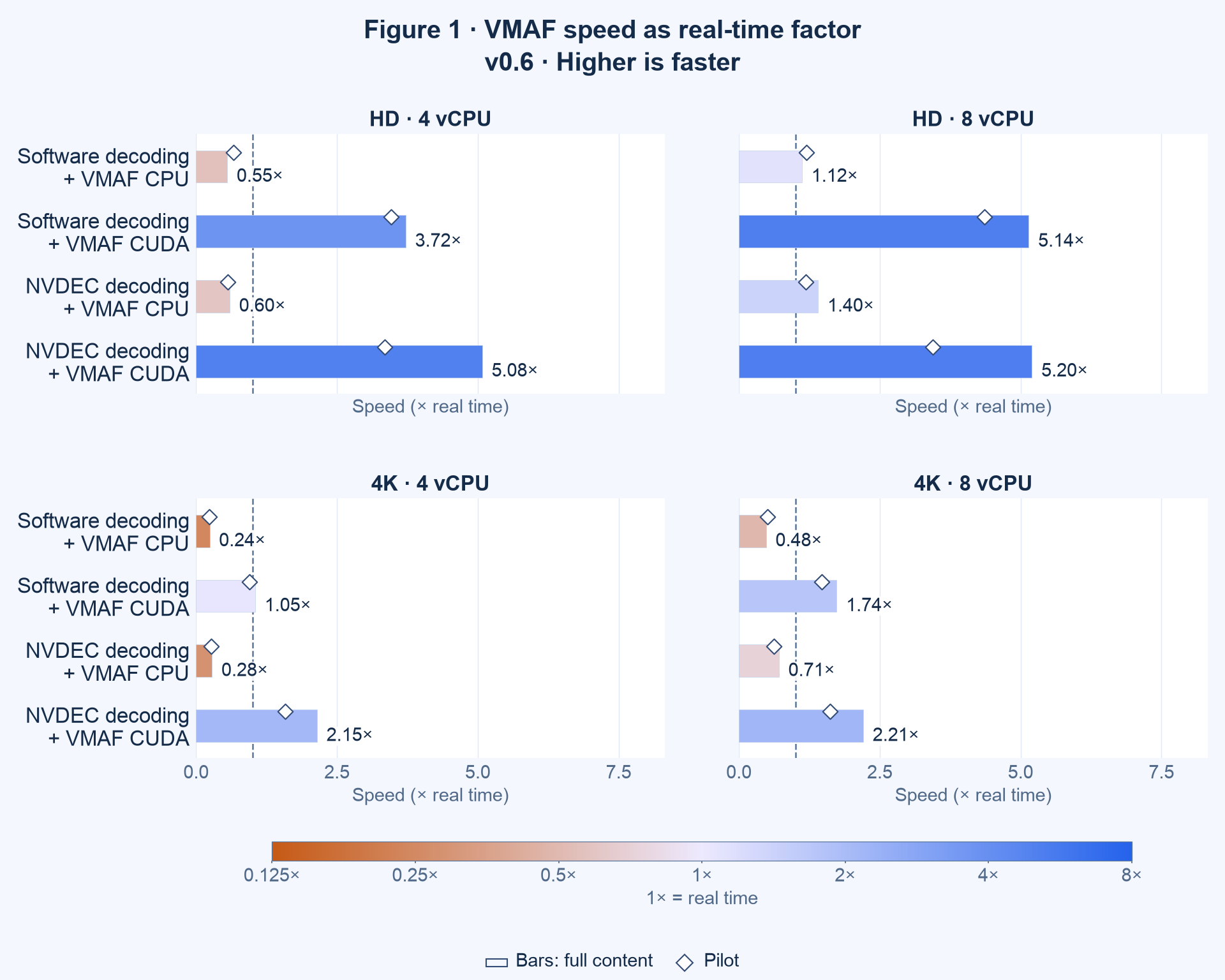
Figure 1. Full-content speed with pilot markers. The dashed reference is 1× playback rate.
In the full-content results for HD on 8 vCPU, all four v0.6 paths exceed 1× playback speed, including software decoding + VMAF CPU at 1.12× and NVDEC decoding + VMAF CPU at 1.40×. On 4 vCPU, the two VMAF CPU paths remain below 1×, while both CUDA paths are faster than playback. Moving VMAF to CUDA while retaining software decoding speeds up the HD workflow 6.73× on 4 vCPU and 4.60× on 8 vCPU.
In the full-content 4K results, only the VMAF CUDA paths exceed 1× playback speed on the measured hardware. Software decoding + VMAF CUDA reaches 1.05× on 4 vCPU and 1.74× on 8 vCPU. Changing decoding to NVDEC raises those speeds to 2.15× and 2.21×, respectively. Comparing the two decoders on the same instance, NVDEC reduces the analysis time by 51.2% on 4 vCPU and by 21.4% on 8 vCPU. The gain is smaller on the larger instance because its software-decoding baseline was already faster (1.74× versus 1.05×). Still, even on 8 vCPU, NVDEC reduces the analysis time by 21.4%, a material observed reduction.
Once both decoding and VMAF use the GPU path, increasing the instance from four to eight vCPU improves processing speed only 2.4% in HD and 2.8% in 4K. This is the more useful infrastructure conclusion: in these workloads, adding CPU capacity contributes little after NVDEC + CUDA has been enabled on the same T4 GPU model.
VMAF v1
Figure 2 keeps the same previous layout but compares software decoding with NVDEC, while VMAF remains on CPU. We did not measure v1 with CUDA VMAF as it is not available.
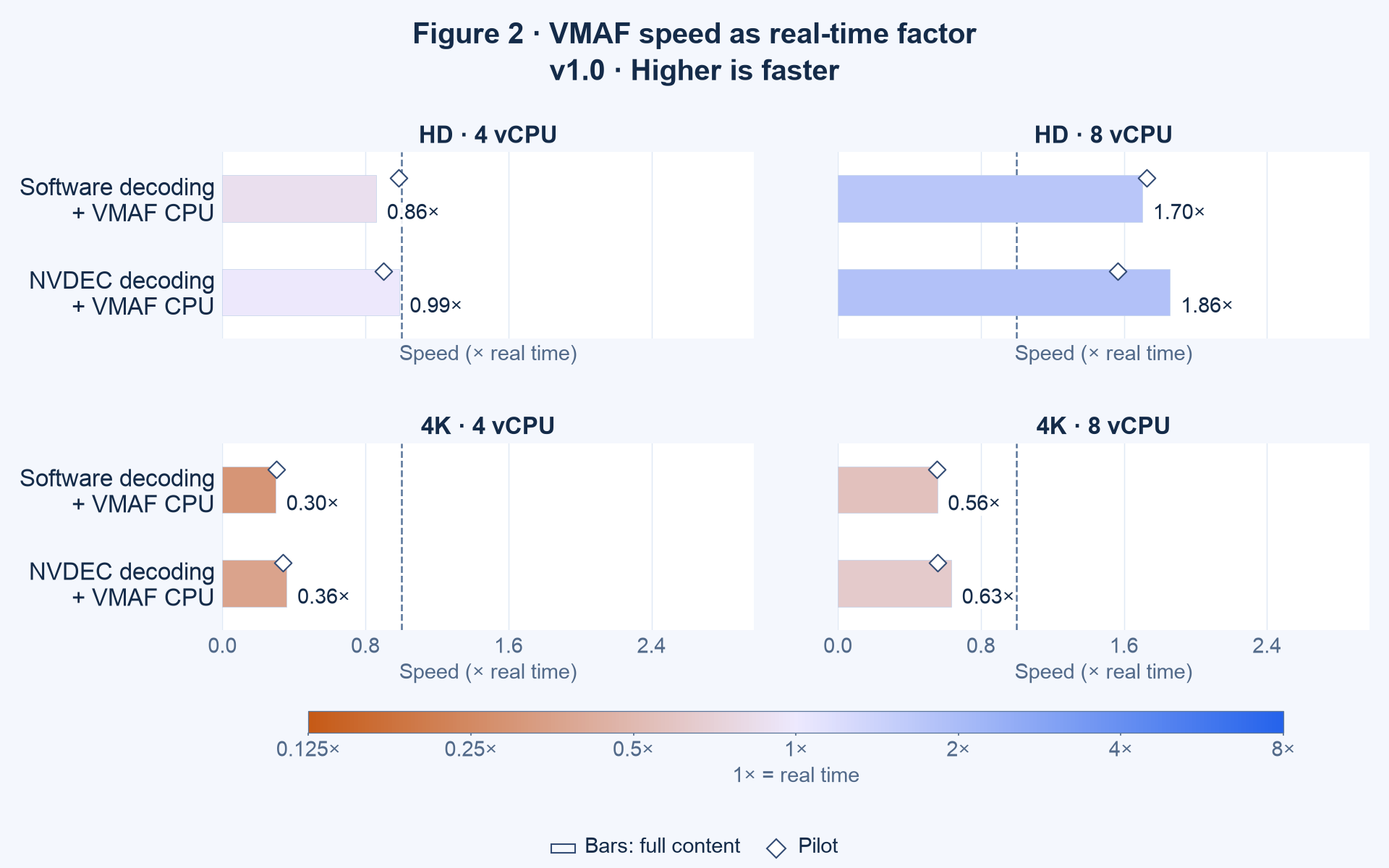
Figure 2. VMAF CPU processing speed with full-content bars and pilot markers. The dashed reference is 1× playback rate.
For full-content HD, VMAF v1 on the 4-vCPU instance comes close to playback rate with NVDEC: processing speed is 0.99×, or 29.66 scored FPS. Software decoding gives 0.86×. On 8 vCPU, both paths are faster than playback: 1.70× with software decoding and 1.86× with NVDEC. On 4 vCPU, this is a clear advantage over v0.6, whose VMAF CPU workflow reaches only 0.55× and 0.60×, respectively. On 8 vCPU, v0.6 VMAF CPU also exceeds playback rate (1.12× and 1.40×), so reaching real time is not exclusive to v1 there. Still, v1 remains faster, by 1.52× with software decoding and 1.32× with NVDEC.
In the full-content comparisons, NVDEC reduces v1 analysis time by 12.9% in HD and 17.2% in 4K on four vCPU, and by 8.4% and 12.3% on eight vCPU. Those changes are smaller than the largest v0.6 CUDA gains, but they are not zero. CPU-based VMAF is a plausible remaining constraint. However, we measured only the total analysis time, not the time of each stage (e.g., filters, 10-bit conversion, VMAF, PSNR), so these timings cannot show that VMAF alone limits the speed.
Figure 3 provides the matched VMAF CPU comparison between model families, holding decoding path and instance fixed. Horizontal bars show the full-content time reduction relative to v0.6, and diamonds show the pilot contrast. Positive values mean less time with v1.0; negative values mean more time.
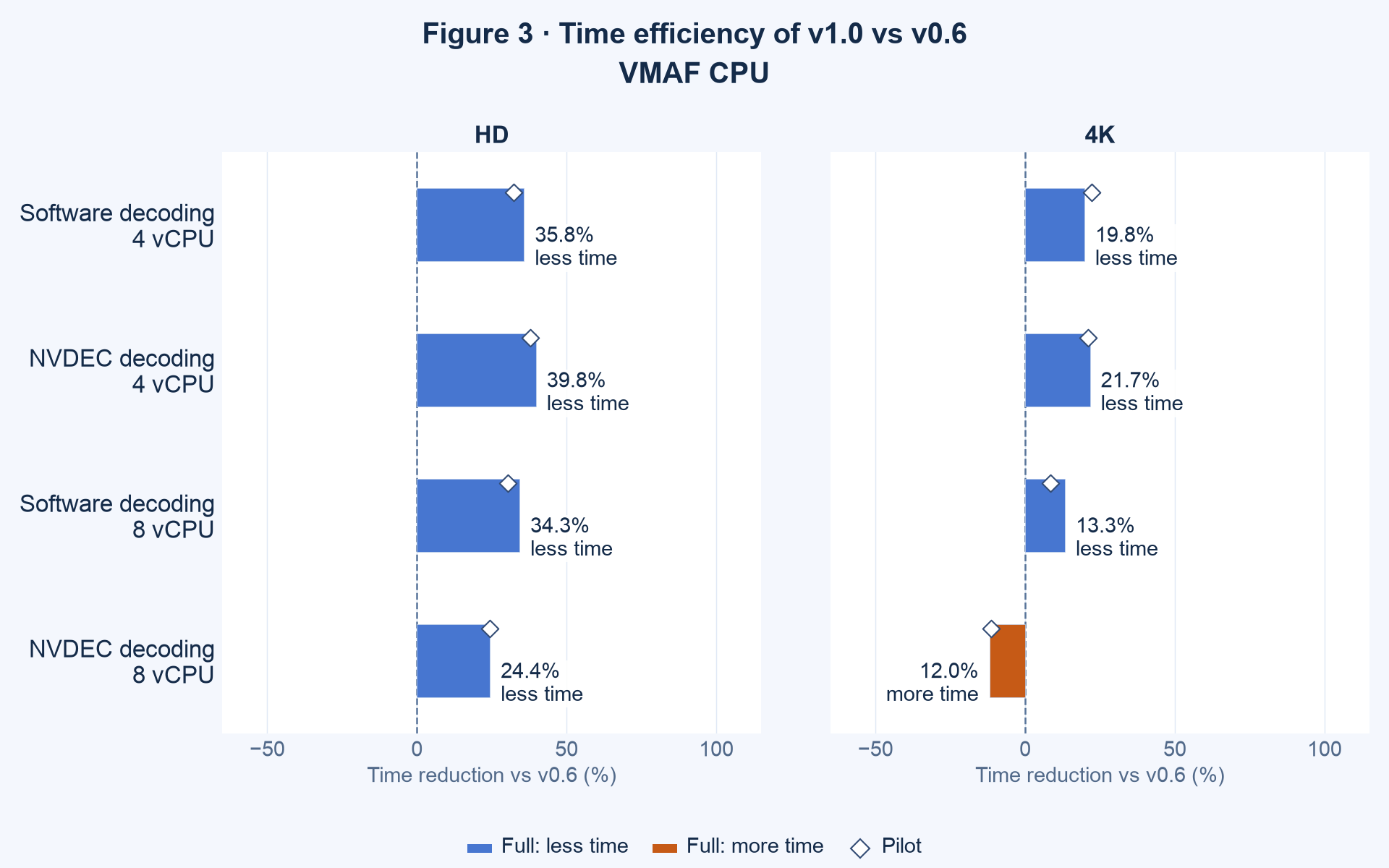
Figure 3. Time reduction with v0.6 as the reference. The workflows differ in models, feature sets, bit depth and, in HD, number of outputs.
For full-content HD, v1 completes the measured CPU-VMAF workflows 24.4–39.8% sooner than v0.6. In 4K with NVDEC and eight vCPU, however, v0.6 CPU VMAF finishes in 893.5 seconds and v1 in 1000.3 seconds. Thus, v1 is not universally faster for every measured workflow. For 4K when the required model is v0.6, CUDA remains the major throughput advantage in this benchmark; this does not make v0.6 a substitute for the quality assessment provided by v1.
The impact of instance size
CPU versus GPU: vertical scalability
Selecting infrastructure means deciding whether we need more CPU capacity, GPU computation, hardware decoding, or a combination of these resources. The preceding figures address GPU use. We now compare the same analysis path on a larger instance before considering horizontal scalability through multiple instances.
For a perfectly parallel workload with no other limiting resource, doubling CPU capacity could double throughput—a 100% speed increase, equivalent to 50% less analysis time. We use that as a reference rather than an expected outcome guaranteed by the instance specification. Figure 4 shows full-content results together with the pilots: the left column gives the percentage speed increase from four to eight vCPU, and the right column connects their absolute processing speeds. Bars and filled markers give full-content results; blue circles identify four vCPU and amber squares identify eight vCPU. White markers give the pilots: diamonds on the bars for the relative increase, and circles and squares above each full-content row for the absolute speeds. The dashed references mark +100% improvement and 1× playback speed, respectively.
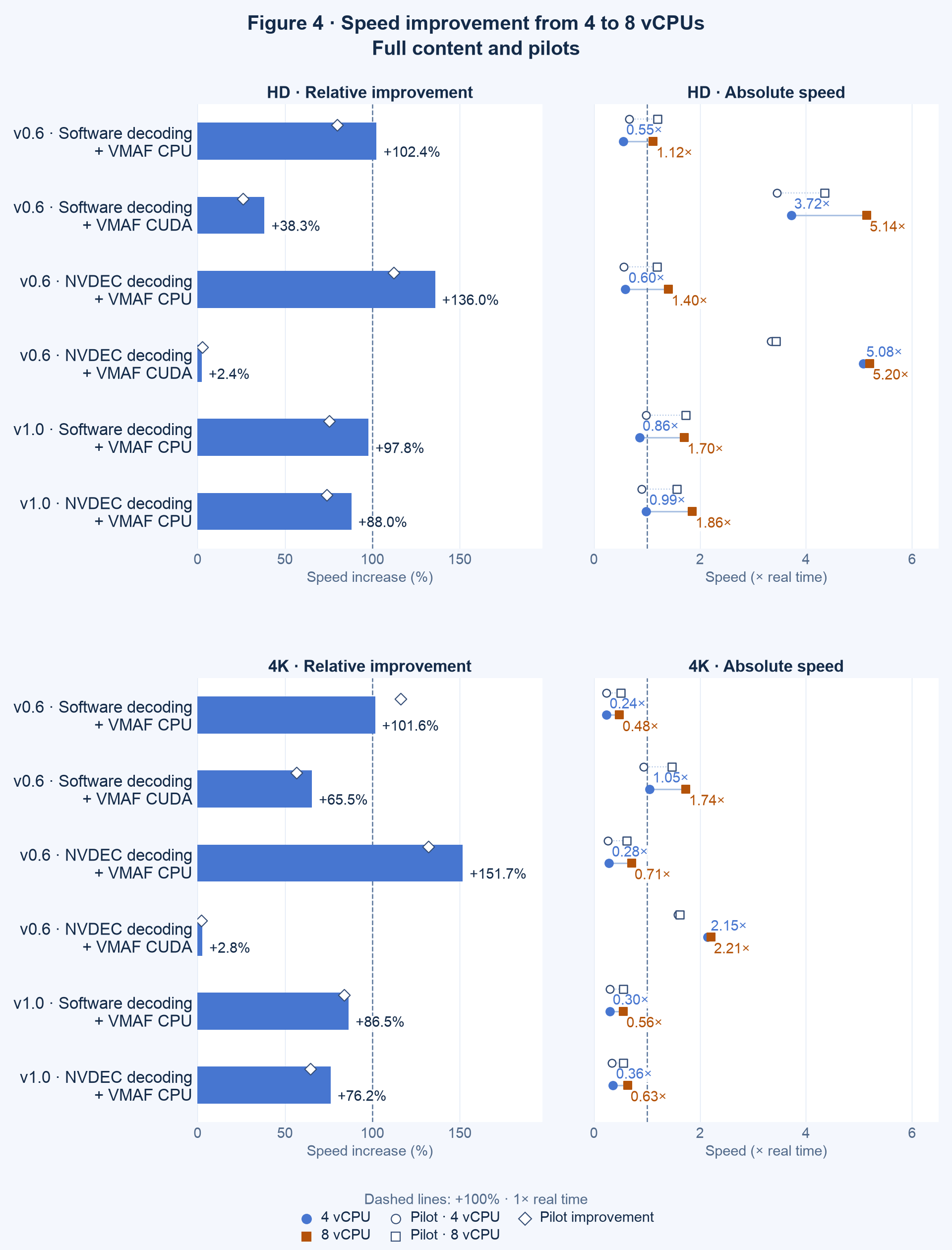
Figure 4. Improvement from four to eight vCPU alongside the speed of each configuration. Filled marks: full content; white marks: pilots.
With CPU decoding + CPU VMAF, v0.6 gains approximately 102% processing speed, while v1 gains 86.5–97.8%. These results are close to the simple doubling reference. With NVDEC + CPU VMAF, v0.6 gains 136.0–151.7% and v1 gains 76.2–88.0%. The result above 100% should not be interpreted as proof of an intrinsically superlinear VMAF algorithm: the instance differences and a single measurement prevent that attribution.
With CPU decoding + CUDA VMAF, the larger instance gains 38.3% in HD and 65.5% in 4K. With NVDEC + CUDA VMAF, the gain falls to 2.4–2.8%. This pattern is consistent with CPU capacity becoming less influential after moving decoding onto NVDEC, but it does not isolate how much CPU time belongs to decoding, filters, PSNR, synchronization, or output work. No video encoding ran during these measurements. We therefore cannot infer whether encoding or VMAF is the more CPU-intensive stage from this experiment.
In 4K, software decoding + VMAF CPU v0.6 improves by +101.6%, but its speed rises only from 0.24× to 0.48×. NVDEC decoding + VMAF CUDA improves by +2.8% while already reaching 2.15× with four vCPU. A large relative improvement therefore does not imply the fastest final configuration.
Resource utilization and the remaining critical path
Figure 5 pairs software and NVDEC decoding for v0.6 with VMAF CUDA, keeping CPU allocation fixed within each pair. Circles show full-content mean CPU utilization and diamonds show pilots. The connecting line identifies the pair without indicating a direction of improvement. Percentages increase from left to right, and 100% corresponds to all allocated vCPUs.
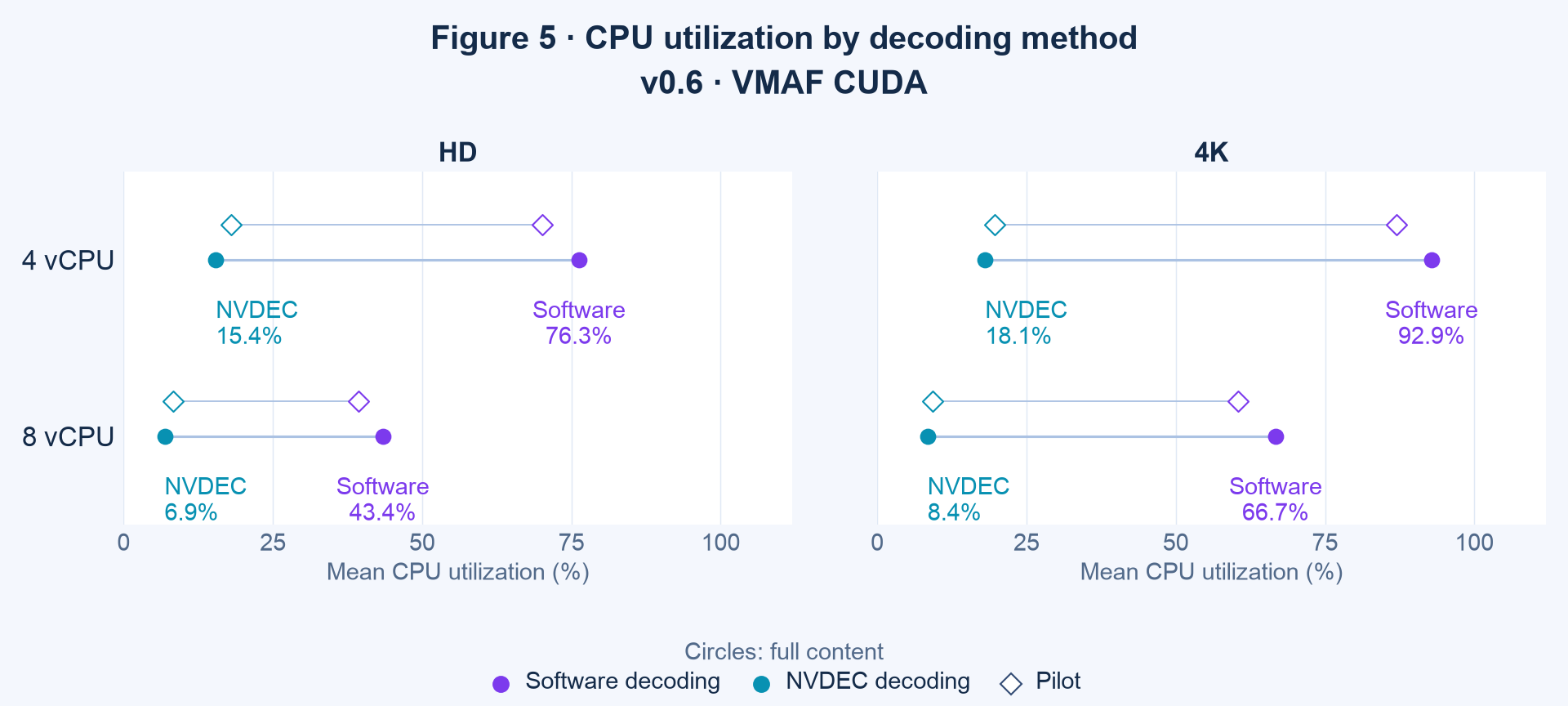
Figure 5. Mean CPU utilization for software and NVDEC decoding with VMAF CUDA, paired within each instance.
In the full-content measurements on four vCPU, replacing software decoding with NVDEC while retaining VMAF CUDA lowers mean CPU utilization from approximately 76% to 15% in HD and from 93% to 18% in 4K. On eight vCPU, the corresponding changes are approximately 43% to 7% and 67% to 8%. These are utilization levels, not percentages of time saved. Together with the small vertical-scaling gain, they support the practical observation that these GPU paths benefit little from the additional CPU allocation. Software also changed between decoding rounds, so the comparison does not isolate hardware decoding alone.
GPU activity
Figures S03 and S04 separate mean GPU compute activity from mean NVDEC activity. Bars show full-content measurements and diamonds show pilots. The counters describe different engines in the same physical GPU: their percentages must not be added or interpreted as a decomposition of end-to-end analysis time. Figure S03 omits the two software decoding + VMAF CPU workflows, which do not use the GPU. Figure S04 omits the software-decoding workflows, whose NVDEC counter was not collected; this absence is not zero activity.
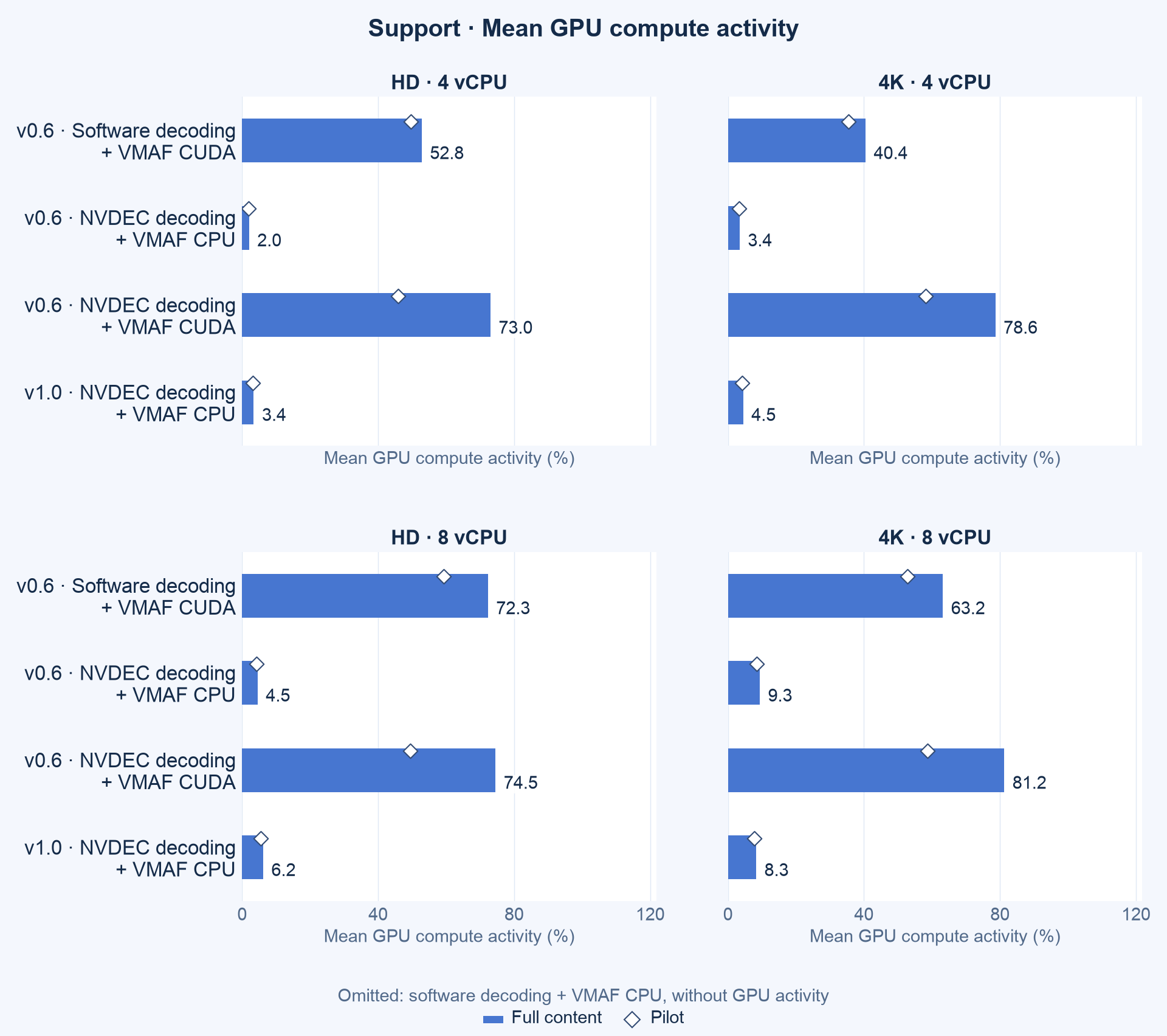
Figure S03. Mean GPU compute activity by workflow and instance, with full-content bars and pilot markers.
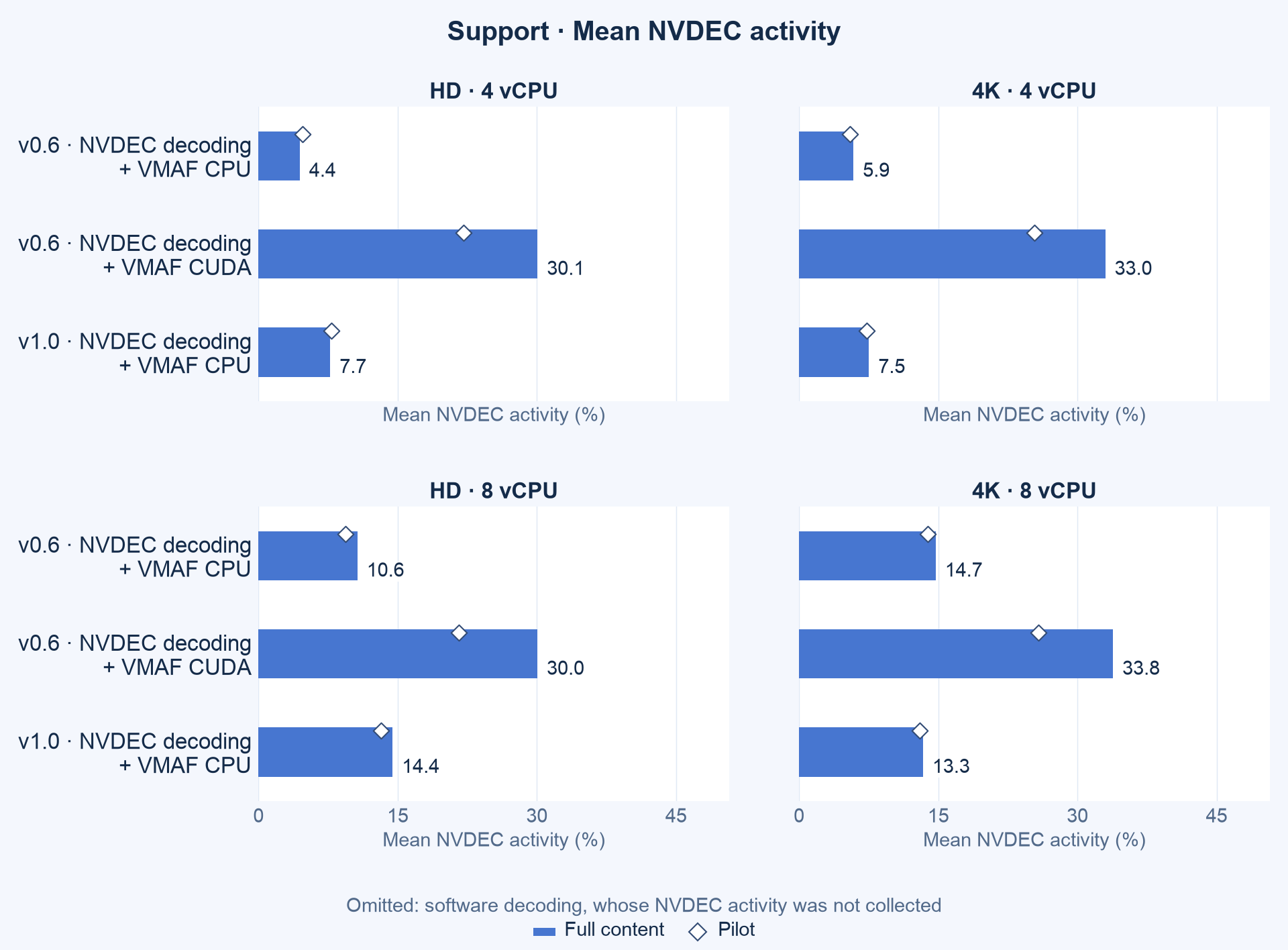
Figure S04. Mean activity of the dedicated decoder. NVDEC telemetry was unavailable in the software-decoding round.
In full-content NVDEC decoding + VMAF CUDA, sampled GPU compute activity averages approximately 73–81%. That does not establish a single saturated GPU bottleneck. GPU compute activity also includes operations other than the VMAF feature calculation, and the CPU counter includes all container work.
Memory requirements
Figure S05 shows memory separately from utilization, with RAM (blue) and VRAM (green) side by side for each workflow on a common GiB axis. RAM is the peak recorded by container cgroup accounting; VRAM is the maximum of periodic GPU-memory samples, so intervening peaks can be missed. Workflows without any GPU stage use no VRAM (0.00 GiB). Bars show full-content runs and diamonds show pilots; their different durations also affect the opportunity to observe a peak.
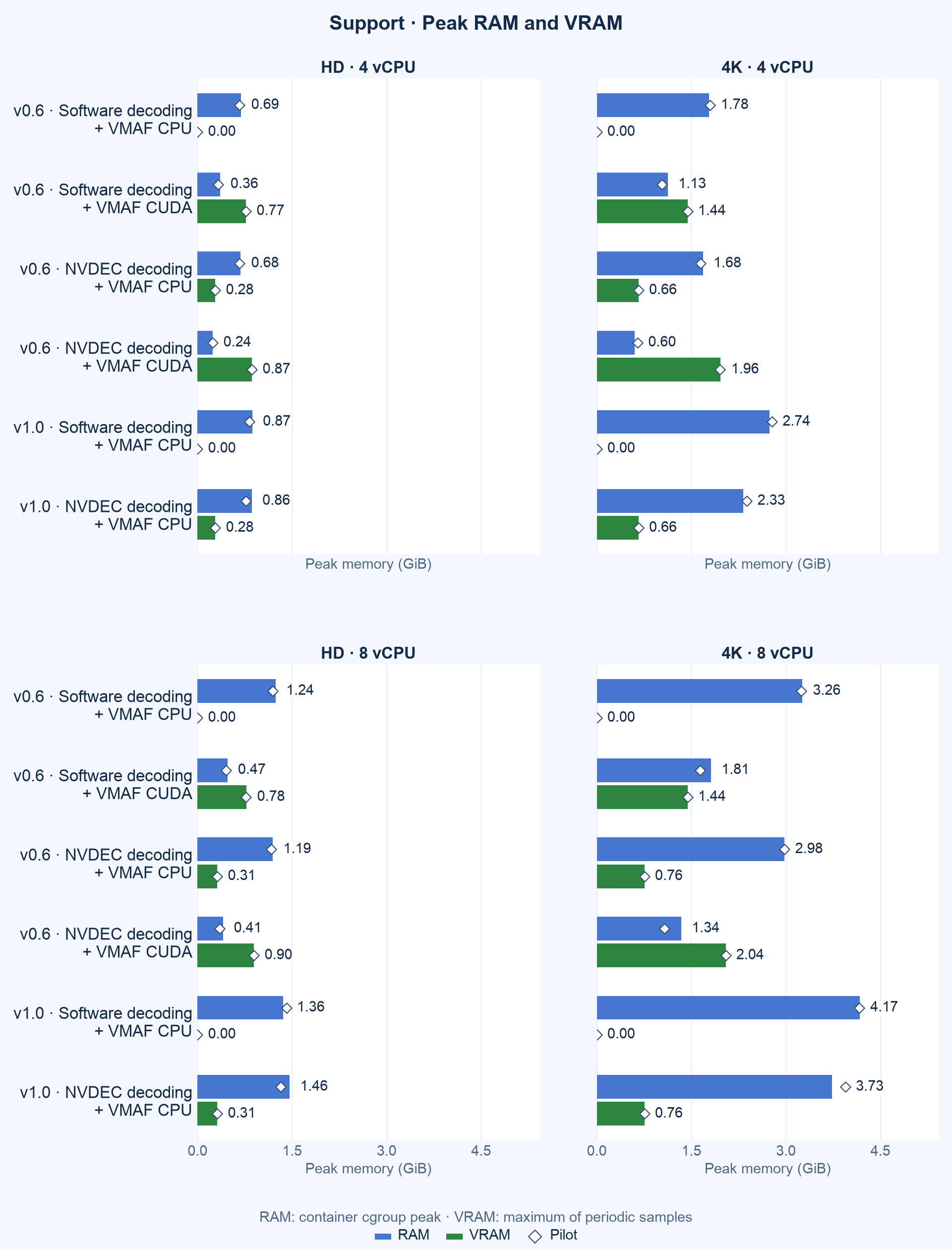
Figure S05. Recorded container RAM peaks and sampled GPU-memory peaks by workflow and instance.
For 4K with eight vCPU and VMAF CUDA, the NVDEC path lowers recorded peak RAM from about 1.81 to 1.34 GiB while increasing sampled peak VRAM from 1473 to 2094 MiB. These are two different memory pools and peak definitions; both matter when selecting infrastructure.
Parallel processing versus increasing CPU capacity
We compare three measured alternatives: a four-vCPU instance with one T4, an eight-vCPU instance with one T4, and the distributed procedure on both available instances, allocating 4 + 8 vCPU and two T4s. Figures 6a and 6b cover the same five workflows across both model families. Distributed v0.6 software decoding + VMAF CPU was not measured and is omitted. The distributed procedure includes the existing, unoptimized orchestrator; it does not estimate performance on two identical four-vCPU instances.
Figure 6a shows full-content scaling response. Each alternative’s relative speed is the four-vCPU standalone time divided by the observed alternative time. Its 1× reference is that standalone baseline, not playback rate. The three positions are discrete execution alternatives. Labels below each panel give the speed increase from four to eight vCPU and from eight vCPU to distributed execution; these successive percentages must not be added.
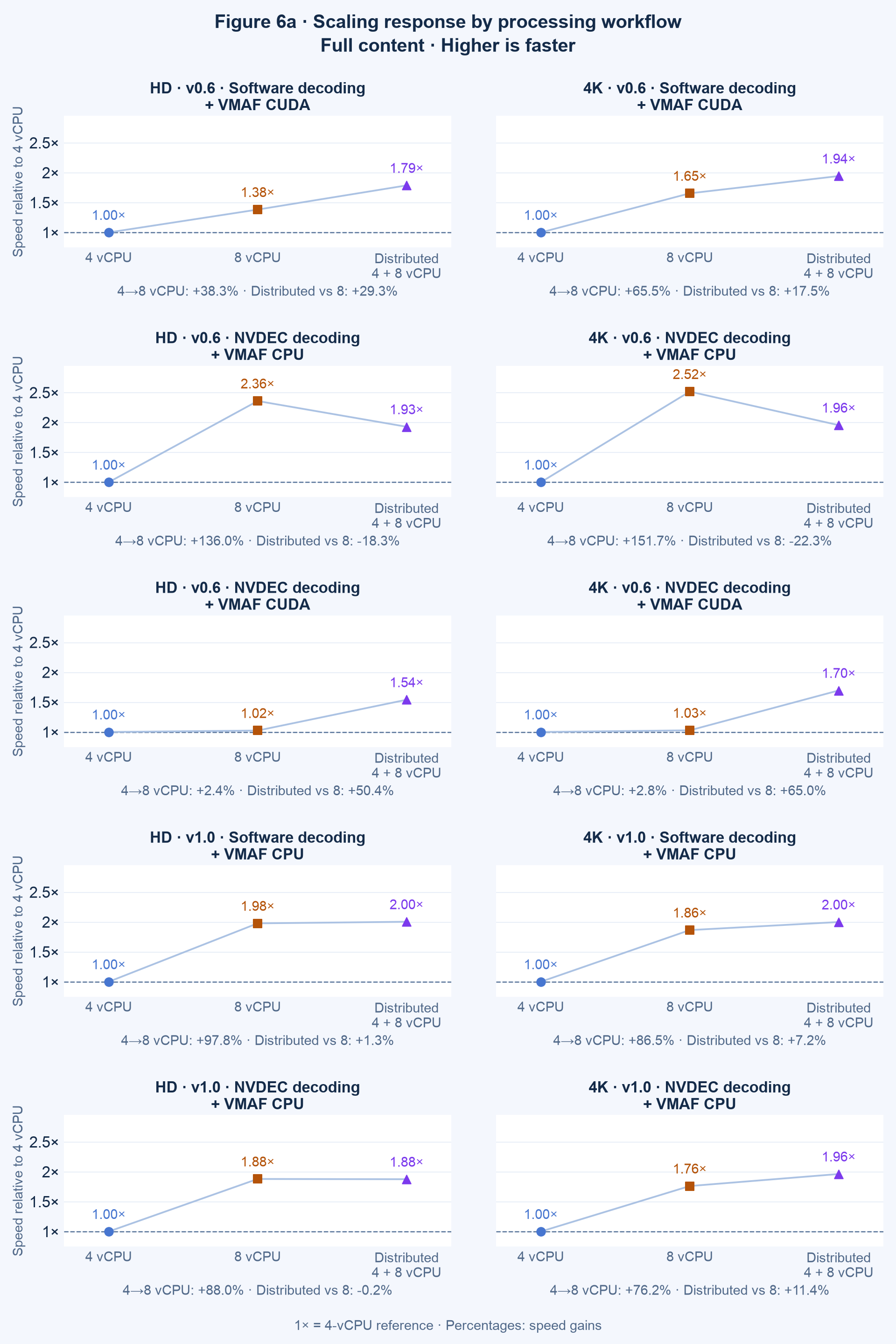
Figure 6a. Full-content relative speed referenced to four vCPU. Distribution uses both unequal instances and two T4 GPUs.
For NVDEC decoding + VMAF CUDA v0.6, added CPU gives only +2.4% in HD and +2.8% in 4K, while distribution improves speed by +50.4% and +65.0% relative to eight vCPU. Software decoding + VMAF CUDA benefits more from additional CPU, whereas NVDEC decoding + VMAF CPU gains substantially from eight vCPU but performs worse with the tested equal split. These responses suggest where CPU allocation matters across the measured workflows; they do not measure decoding or VMAF computation time separately.
Figure S01 compares each chunk with the unsplit run on its own instance, model, workflow and scope. The dashed reference is 50%; full-content worker fractions are bars and pilot fractions are diamonds. The full-content chunks take 46.3–54.2% of their own instance’s unsplit time, indicating broadly similar local throughput when analyzing half the frames. Pilot chunks take 52.6–69.6%, and the fraction grows as the unsplit run gets shorter: the NVDEC + VMAF CUDA pilots, which last 26–57 s unsplit, reach 66.1–69.6%. This pattern is consistent with a fixed cost per run (e.g., container start, input probes, model loading) that halving the frames does not halve. If a chunk takes F + t/2 and the unsplit run F + t, the NVDEC + VMAF CUDA results imply a fixed cost of roughly 8–10 s in HD and 15–19 s in 4K, similar in pilots and full content. Hence, in practice, chunks should be long enough for this cost to remain small; splitting a title into many short chunks would erode the parallel gain. We did not measure the fixed cost directly, reverse the assignments or test two identical instances. Nor do these results evaluate multiple concurrent full-title analyses, another form of horizontal scalability.
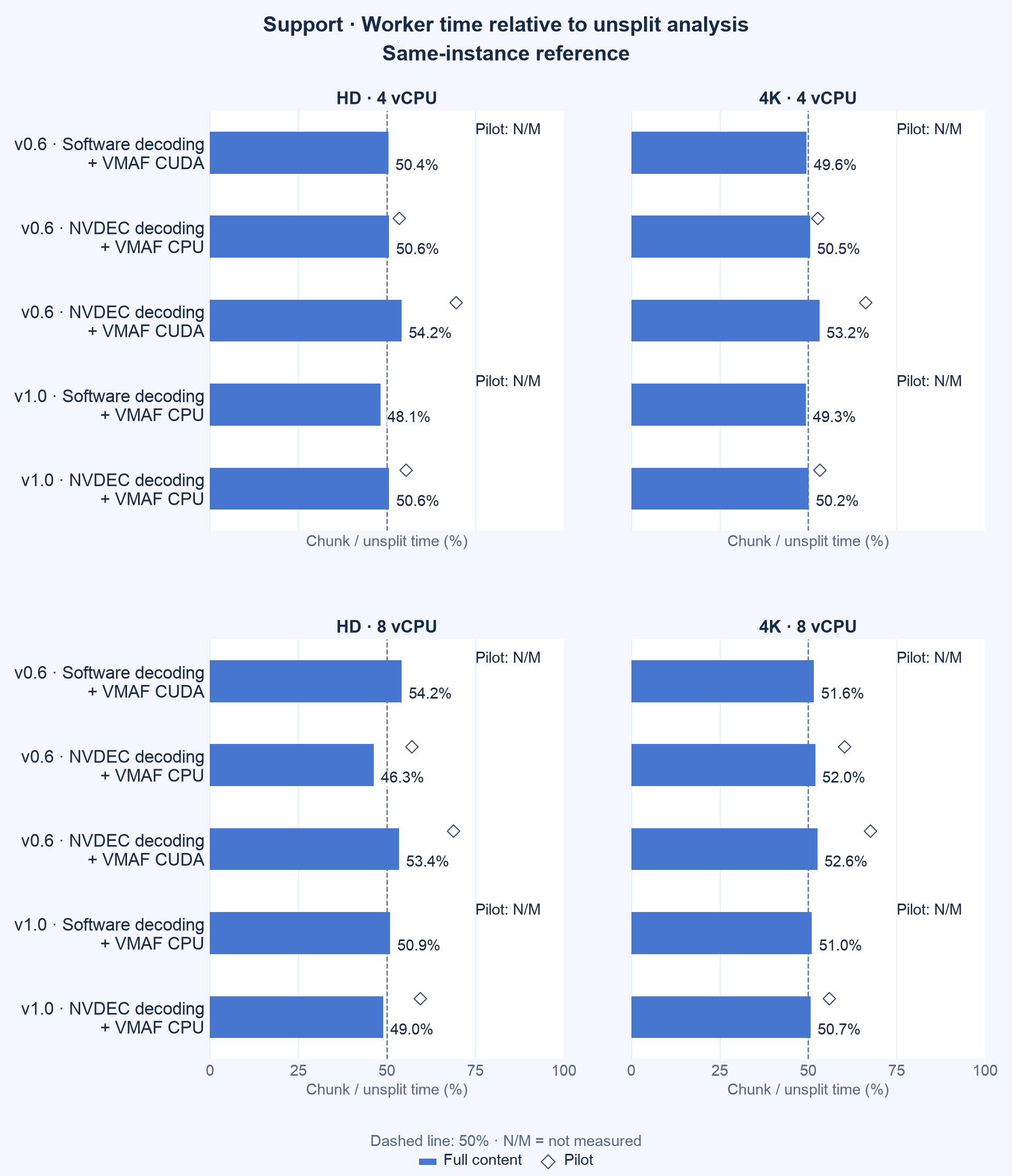
Figure S01. Local chunk time as a percentage of its matched unsplit analysis; the reference is 50%.
Absolute speed by execution mode
Figures S12 and S13 retain absolute processing speed for the three execution alternatives, separating v0.6 and v1.0. Full-content bars and pilot diamonds use D/T, with 1× marking playback rate. The shared speed palette matches Figures 1–2, while panel axes are independent. N/M identifies a missing distributed pilot. Unlike Figure 6a, these plots show speed relative to playback rather than to the four-vCPU baseline.
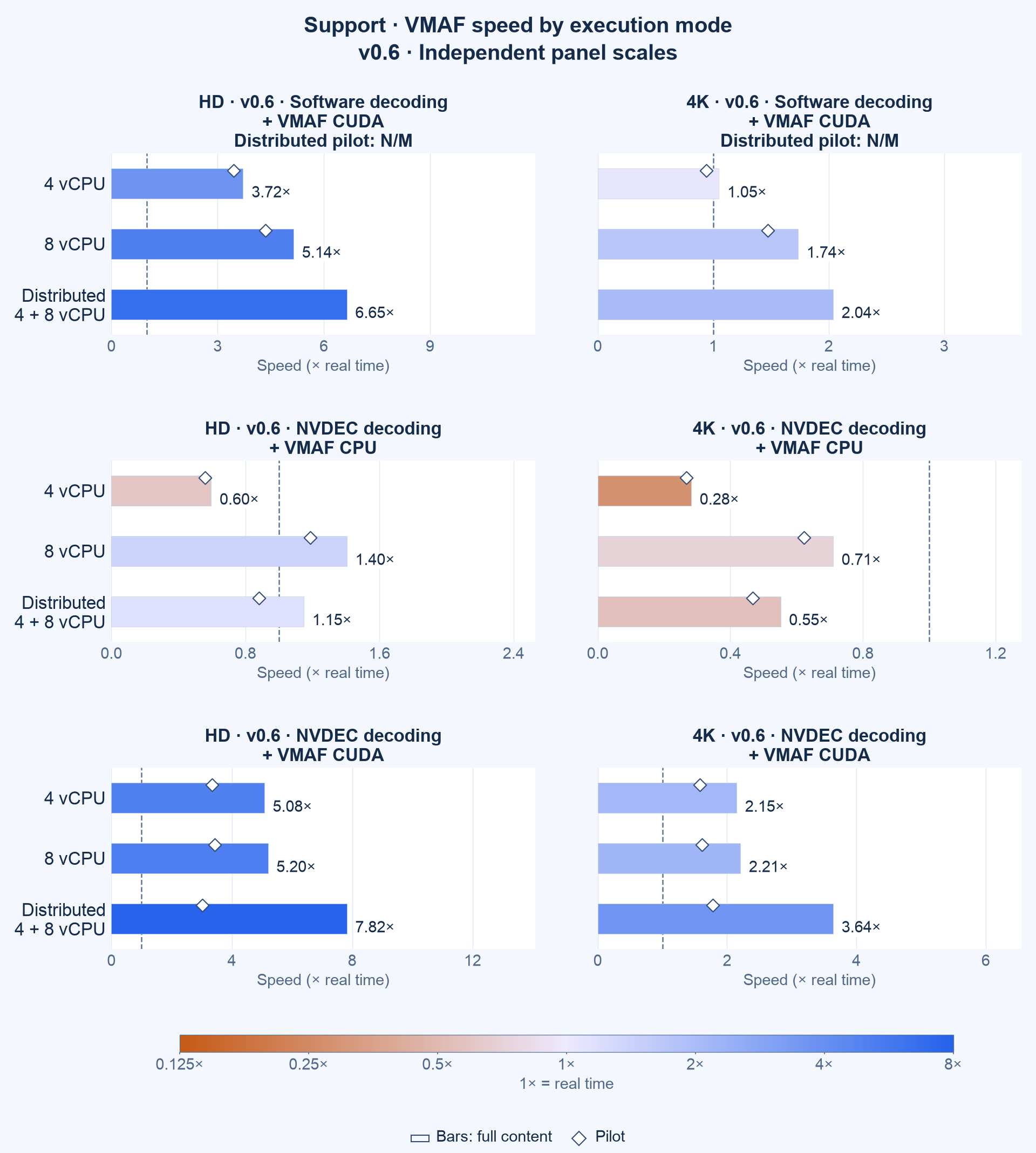
Figure S12. Absolute speed for single-instance and distributed v0.6 workflows, with available pilots.
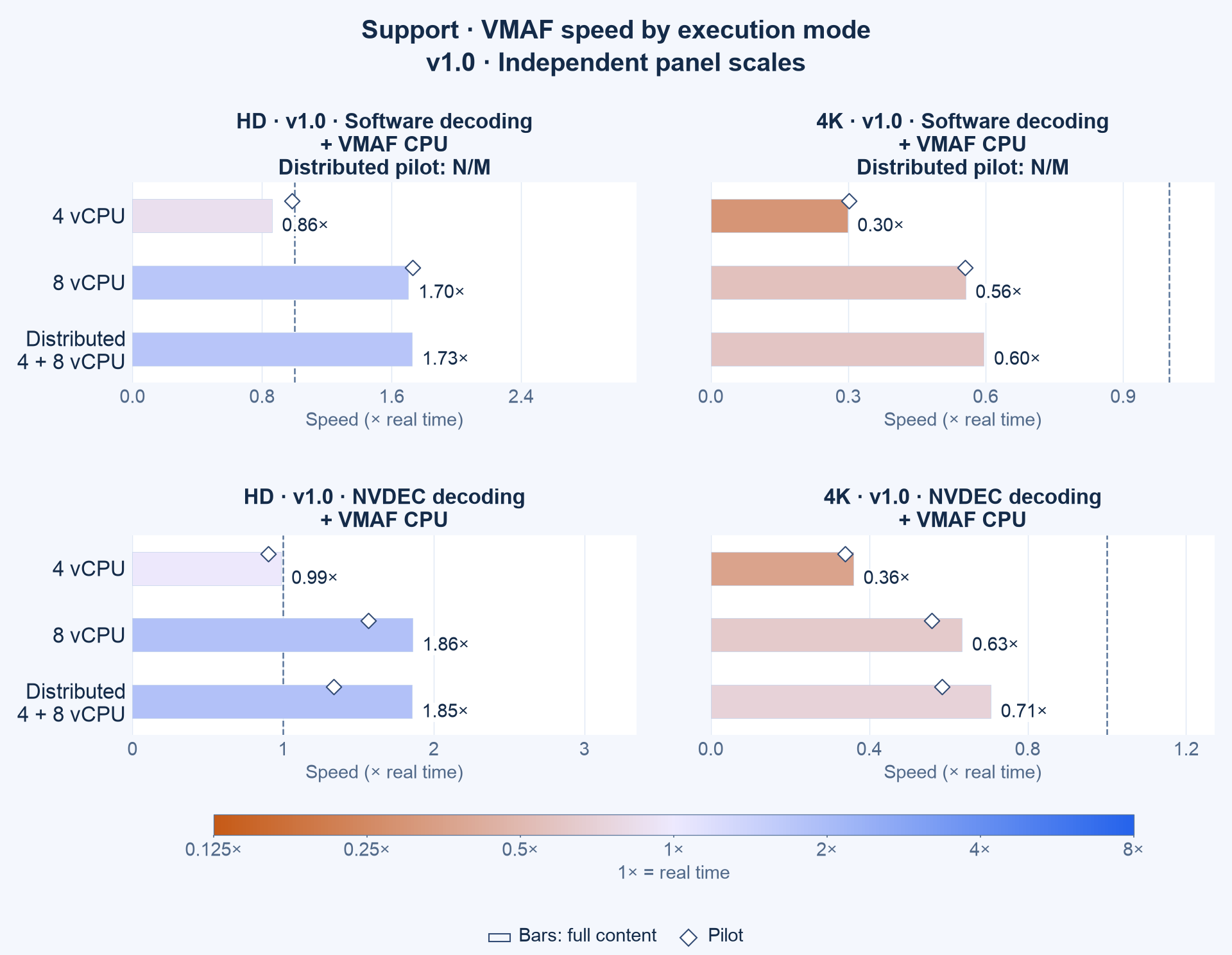
Figure S13. Absolute speed for single-instance and distributed v1.0 workflows, with available pilots.
Translating processing time into infrastructure cost
The original infrastructure question is cost-benefit, not merely speed. In this section, we apply public on-demand prices to the observed times and compare the charge per hour of analyzed video for every measured workflow, on instances with and without a GPU. We first describe the prices and the cost model, then present all charges in one table, and finally discuss each model family and the instance size. The cheapest model, however, still depends on which model’s output is required.
Prices and cost model
We use the public Linux on-demand rates for us-east-1 (N. Virginia) with shared tenancy, as published by AWS on 2026-10-15. Besides the two g4dn instances we measured, we include general-purpose m5 instances without a GPU.
| Instance | vCPU | RAM | GPU | Hourly price |
|---|---|---|---|---|
| m5.xlarge | 4 | 16 GiB | None | US\$0.192 |
| m5.2xlarge | 8 | 32 GiB | None | US\$0.384 |
| g4dn.xlarge | 4 | 16 GiB | One T4 | US\$0.526 |
| g4dn.2xlarge | 8 | 32 GiB | One T4 | US\$0.752 |
For an instance with hourly price $p$ that analyzes $D$ seconds of video in $T$ seconds, we express the compute charge per hour of analyzed video as
\[C = p \times \frac{T}{D}\]Said differently, $C$ is the hourly price divided by the processing speed. This excludes instance startup, downloads, storage, transfers, idle time, and minimum billing effects; actual billable duration must replace $T$ for a production estimate. Note that $C$ does not depend on how many instances run in parallel: adding instances shortens turnaround time, but not the charge for each analyzed hour.
We did not measure GPU-less instances. As an approximation, we apply to each m5 instance the software decoding + CPU VMAF times measured on the g4dn instance with the same vCPU count and an idle T4. We expect similar, though not identical, CPU throughput.
Cost per hour of analyzed video
The following table compares all measured single-instance workflows at these prices. The lowest charge in each model family and resolution is in bold.
| Model | Instance | GPU | Workflow | HD speed | HD cost per video hour | 4K speed | 4K cost per video hour |
|---|---|---|---|---|---|---|---|
| v0.6 | m5.xlarge* | None | Software decoding + VMAF CPU | 0.55× | \$0.347 | 0.24× | \$0.803 |
| v0.6 | m5.2xlarge* | None | Software decoding + VMAF CPU | 1.12× | \$0.343 | 0.48× | \$0.797 |
| v0.6 | g4dn.xlarge | T4 | Software decoding + VMAF CPU | 0.55× | \$0.952 | 0.24× | \$2.200 |
| v0.6 | g4dn.2xlarge | T4 | Software decoding + VMAF CPU | 1.12× | \$0.672 | 0.48× | \$1.560 |
| v0.6 | g4dn.xlarge | T4 | Software decoding + VMAF CUDA | 3.72× | \$0.141 | 1.05× | \$0.502 |
| v0.6 | g4dn.2xlarge | T4 | Software decoding + VMAF CUDA | 5.14× | \$0.146 | 1.74× | \$0.433 |
| v0.6 | g4dn.xlarge | T4 | NVDEC + VMAF CPU | 0.60× | \$0.883 | 0.28× | \$1.865 |
| v0.6 | g4dn.2xlarge | T4 | NVDEC + VMAF CPU | 1.40× | \$0.535 | 0.71× | \$1.059 |
| v0.6 | g4dn.xlarge | T4 | NVDEC + VMAF CUDA | 5.08× | \$0.104 | 2.15× | \$0.245 |
| v0.6 | g4dn.2xlarge | T4 | NVDEC + VMAF CUDA | 5.20× | \$0.145 | 2.21× | \$0.341 |
| v1 | m5.xlarge* | None | Software decoding + VMAF CPU | 0.86× | \$0.223 | 0.30× | \$0.644 |
| v1 | m5.2xlarge* | None | Software decoding + VMAF CPU | 1.70× | \$0.226 | 0.56× | \$0.691 |
| v1 | g4dn.xlarge | T4 | Software decoding + VMAF CPU | 0.86× | \$0.611 | 0.30× | \$1.765 |
| v1 | g4dn.2xlarge | T4 | Software decoding + VMAF CPU | 1.70× | \$0.442 | 0.56× | \$1.353 |
| v1 | g4dn.xlarge | T4 | NVDEC + VMAF CPU | 0.99× | \$0.532 | 0.36× | \$1.461 |
| v1 | g4dn.2xlarge | T4 | NVDEC + VMAF CPU | 1.86× | \$0.405 | 0.63× | \$1.186 |
*Projected: speeds measured on the g4dn instance with the same vCPU count and an idle T4.
Figure 7 shows the same charges as a function of processing speed. Both axes are logarithmic, so every workflow on one instance lies on a diagonal of constant price: moving along a diagonal changes the workflow on the same instance, and moving between diagonals changes the instance price. Points toward the lower right are faster and cheaper. For v0.6, the NVDEC + CUDA VMAF points sit furthest to the lower right, far from the CPU-only points. For v1, NVDEC shifts the g4dn points slightly to the right along their diagonals, but they remain above the CPU-only points.
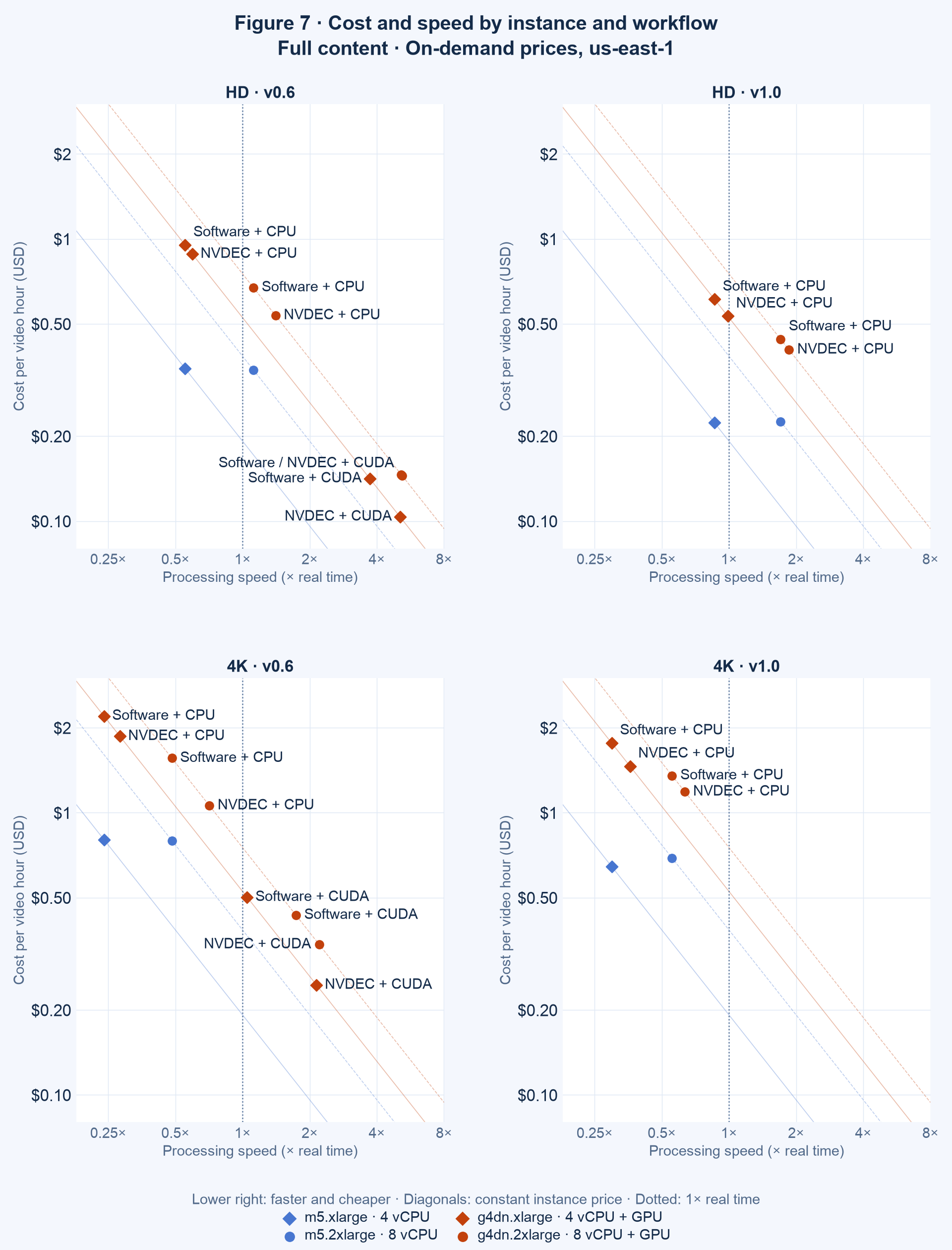
Figure 7. Charge per hour of analyzed video versus processing speed, by model family and resolution. Orange: GPU instances (g4dn); blue: CPU-only instances (m5), projected from g4dn timings. Diamonds: four vCPU; circles: eight vCPU.
At the lowest charge of each family, analyzing an hour of video with v1 costs about 2.1 times as much as with v0.6 in HD, and 2.6 times in 4K. As discussed in Tested workflows, this compares complete default workflows rather than equivalent model outputs.
v0.6: the GPU path is faster and cheaper
For v0.6, the GPU instance is both faster and cheaper. On g4dn.xlarge, NVDEC + CUDA VMAF analyzes an hour of video for approximately one-third of the best CPU-only charge: US\$0.10 versus US\$0.34 in HD, and US\$0.25 versus US\$0.80 in 4K. Said differently, matching the throughput of one g4dn.xlarge would require about 4.5 m5.2xlarge instances running in parallel, at approximately US\$1.74 per hour instead of US\$0.53.
Compute-optimized c5 instances cost about 11% less than m5 for the same vCPU count (US\$0.170 and US\$0.340 per hour) and run at a higher clock, so they could narrow the gap slightly. Even if they were only as fast as m5, the v0.6 GPU path would remain approximately three times cheaper. We did not measure them.
v1: hardware decoding helps, but CPU-only instances are cheaper
For v1, hardware decoding helps, but it does not offset the price of the GPU instance. On the same g4dn instance, NVDEC makes v1 1.09–1.21 times faster than software decoding, and g4dn.2xlarge with NVDEC is the fastest v1 option we measured (1.86× real time in HD and 0.63× in 4K). However, the projected m5 charge, approximately US\$0.22 per hour of HD video and US\$0.64 per hour of 4K video, is about 45% below the cheapest g4dn option for v1 (US\$0.41 and US\$1.19). To match the m5 charge, NVDEC would have to make v1 about 2.0 times faster on eight vCPU and 2.7 times faster on four vCPU, i.e., the g4dn/m5 price ratios.
Hence, in practice, a GPU instance is worthwhile for v1 when turnaround time per instance matters more than cost, or when the GPU is already paid for by other work in the same pipeline (e.g., encoding). In the latter case, NVDEC reduces v1 analysis time without an additional instance charge. Otherwise, scaling v1 at the lowest cost means adding CPU-only instances.
Four versus eight vCPU
The answer depends on whether the instance price grows with its vCPUs. On CPU-only m5 instances, it does: m5.2xlarge costs exactly twice as much as m5.xlarge, and CPU VMAF nearly doubles its speed with twice the vCPUs. Both sizes therefore cost about the same per hour of analyzed video (within about 1%, except 7% for v1 in 4K). Said differently, on CPU-only instances there is no cost advantage, and the choice depends only on the turnaround time required.
On g4dn, the price grows less than the vCPUs, because both sizes include the same T4: g4dn.2xlarge costs 1.43 times as much as g4dn.xlarge. In this case, the workflow decides which size is cheaper:
- Workflows whose VMAF runs on the CPU nearly double their speed on eight vCPU, so g4dn.2xlarge is both faster and 19–43% cheaper per video hour.
- NVDEC + CUDA VMAF gains only 2–3% from the larger instance, so g4dn.xlarge is 28% cheaper at almost the same speed.
- Software decoding + CUDA VMAF lies between both cases: the four-vCPU instance is 3% cheaper in HD, and the eight-vCPU instance 14% cheaper in 4K.
In general, the larger instance has a lower charge per video hour when its speedup exceeds its price premium:
\[\frac{T_4}{T_8} > \frac{p_8}{p_4}\]